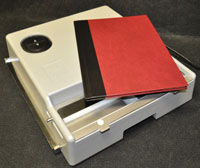
Màquina AG Press

In just a finger press time with the minimum effort.

It may be reopened at any time without damaging the documents and covers that could be re-used after.

   
Thanks to the 8 different backbone thickness ranges of the AG PRESS system you can bind from 10 up to 300 sheets. In addition, the universal AG PRESS system allows you to bind different capacity ranges without having to modify the binder.
Màquina AG Press

Reference no. Sheets
548.R1 from 10 up to 40 sheets
548.R2 from 41 up to 95 sheets
548.R3 from 96 up to 125 sheets
548.R4 from 126 up to 150 sheets
548.R5 from 151 up to 185 sheets
548.R6 from 186 up to 225 sheets
548.R7 from 226 up to 265 sheets
548.R8 from 266 up to 300 sheets

Presentation:

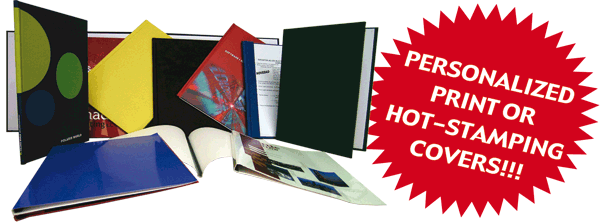
Hardback cover qualities:

  • Standard: Badalek cover material burgundy colour.
  •  

  • Request to specify fabrication:
    • Personalized printing cover: Printing paper PVC-coated covering matt or glassy.
    • Badalek vovering material hot stamping (+iron)
    • "Glass" cover: Transparent plstinc front cover and badalek back hardcover.


Softback cover qualities:


  • Standard: Glossy grey - green - red - blue - black card 250gr.
  • Personalized printing cover: Printing card (4+0) matt or glossy.


Instructions for use:

Binding

Choose the appropriate cover depending on your document's thickness. The AG PRESS system offers you 8 different capacity ranges.

Place the document to be bound inside the opening of the AG PRESS

PUSH the Forward-button. Once the right pressure has been reached, AG PRESS stops automatically. PUSH again to ensure a permanent binding.

PUSH now the Backward-button.

Remove the bound document.

We recommend to repeat these steps on both sides of the cover (front and rear).

Unbinding

If you wish to remove and insert pages, AG PRESS has a special arm designed to unbind the document without damaging it which allows you to reuse the cover.

Place the unbinding arm approximately in the middle of the open document.

Push the Forward-button so as to be able to attach the arm at the external side of the machine. Hang the arm onto the machine by sliding the slits at the arm's ends into the binder's side-protrusions.

Keep the binding's backbone leaning on the frontal part of the binder.

Push now the Backwards-button. The binder will start pulling the arm inwards. Once the right pressure has been reached, AG PRESS stops automatically.

Push the Forwards-button again to remove the arm from the machine.

Take it out from the document.

Now your document is loose again!

 
Copyright © 2008 AG Ediciones, S.L.U.